Architecture
hns is a single-module CLI tool. The entire implementation lives in hns/cli.py. This page covers the internal architecture to help contributors get up to speed quickly.
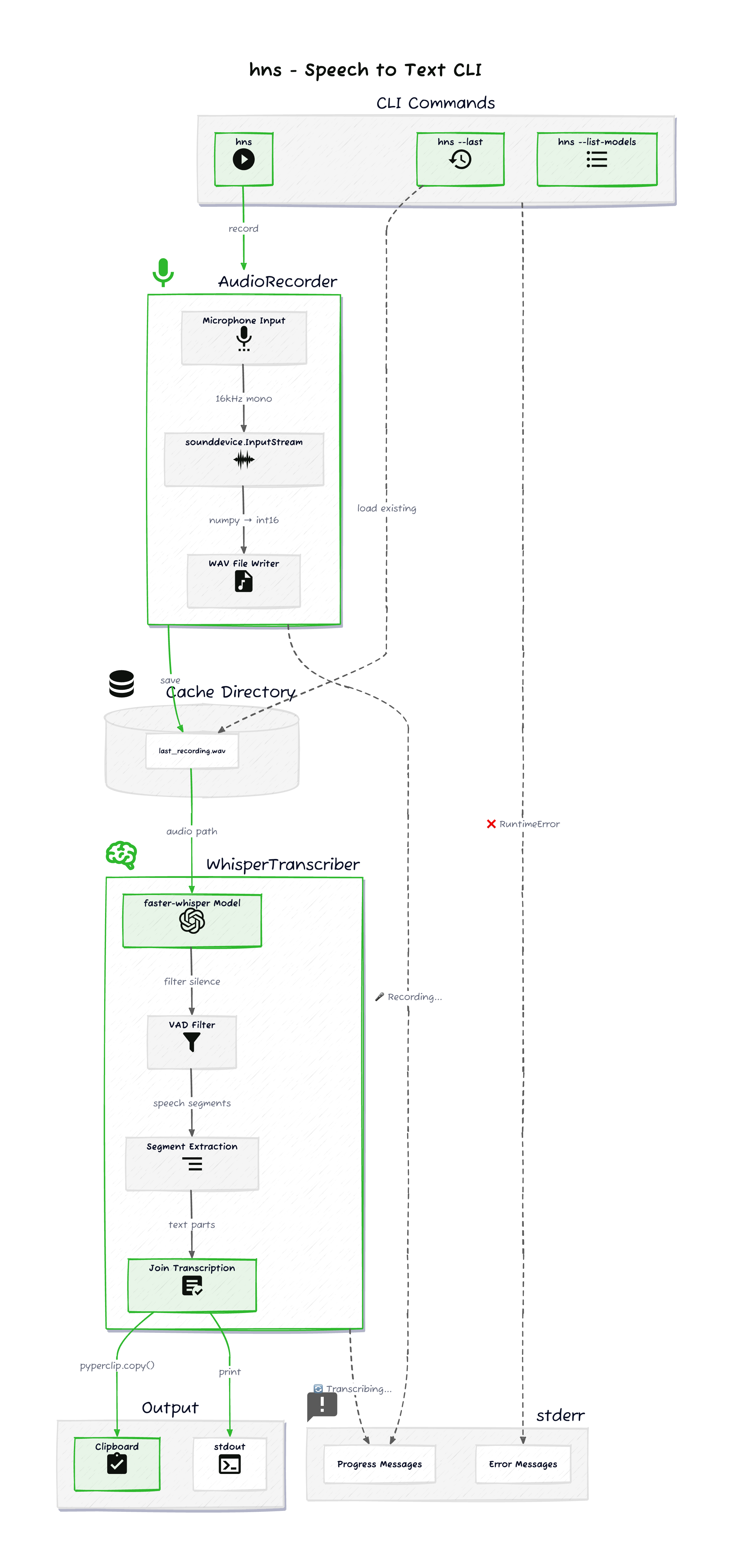
High-Level Flow
- CLI entry. Click parses arguments and dispatches to one of three paths:
hns(record + transcribe),hns --last(transcribe cached audio), orhns --list-models(print models and exit). - Record.
AudioRecordercaptures microphone input viasounddevice, streams it to a WAV file in the platform cache directory. - Transcribe.
WhisperTranscriberloads a faster-whisper model and transcribes the WAV file locally. VAD filters silence. Segments are joined into a single string. - Output. Transcription is printed to stdout and copied to the clipboard via
pyperclip. All progress and error messages go to stderr.
This stdout/stderr separation is what makes hns composable. stdout carries only the transcription, so it can be piped or captured with $(hns) without interference from status messages.
Core Components
AudioRecorder
Records microphone audio and writes it to disk.
| Responsibility | Detail |
|---|---|
| Audio capture | sounddevice.InputStream at 16kHz mono, float32 samples converted to int16 |
| File output | WAV written to platform-specific cache directory (last_recording.wav) |
| Live feedback | Background thread prints elapsed time to stderr while recording |
| Stop signal | Blocks on input(). User presses Enter to stop |
Cache paths:
| Platform | Path |
|---|---|
| macOS | ~/Library/Caches/hns/ |
| Linux | ~/.cache/hns/ |
| Windows | ~/AppData/Local/hns/Cache/ |
The cached WAV file is what --last reads from to re-transcribe without re-recording.
WhisperTranscriber
Loads a Whisper model and transcribes audio.
| Responsibility | Detail |
|---|---|
| Model loading | faster-whisper with CPU / int8 quantization. Model name from HNS_WHISPER_MODEL env var, defaults to base |
| VAD | Built-in VAD filter (min_silence_duration_ms=500, speech_pad_ms=400, threshold=0.5) strips silence before transcription |
| Transcription | Beam search (beam_size=5), optional language forcing via HNS_LANG |
| Progress | Background thread shows elapsed time on stderr during transcription |
| Output | Segments joined with spaces into a single string |
Invalid model names fall back to base with a warning.
Output Layer
After transcription:
pyperclip.copy()copies the text to the system clipboard.print()writes the text to stdout (via a separateConsoleinstance bound to stdout).
Clipboard errors are caught and warned, but they don't abort the process.
Dependencies
| Package | Role |
|---|---|
click | CLI argument parsing |
sounddevice | Microphone audio capture |
numpy | Audio sample conversion (float32 to int16) |
faster-whisper | Local Whisper inference (CTranslate2 backend) |
pyperclip | Cross-platform clipboard access |
rich | Styled stderr output |
Threading Model
hns uses threads in two places:
- Recording timer. A daemon thread updates the elapsed time display on stderr while
sounddevice.InputStreamcaptures audio on its own callback thread. Recording stops wheninput()returns (Enter key). - Transcription progress. Transcription runs in a background thread so the main thread can display an elapsed time counter. Results pass back via a
queue.Queue.
Both use threading.Event for clean shutdown coordination.
Entry Point
The Click command main() in cli.py is registered as the hns console script in pyproject.toml:
[project.scripts]
hns = "hns.cli:main"
This is what makes hns available as a command after installation with uv, pipx, or pip.